Computational Domain, Mesh, and Boundary Definitions
OFFBEAT, like OpenFOAM, operates using a cell-centered finite-volume framework. The computational domain is discretized into cells and the patches (i.e., the boundaries) are divided into faces. Although OpenFOAM supports arbitrary unstructured polyhedral meshes, hexagonal (hexahedral) meshes are often used in OFFBEAT for 1D up to 2D r-z simulations (even with discrete pellets) because of the relative simplicity of nuclear fuel rod geometries and the high accuracy they provide for such structured domains.
This part of the User's Guide provides essential information about OFFBEAT meshes. However, we will not cover every aspect of mesh generation, and it is strongly recommended that users familiarize themselves with OpenFOAM basics, particularly OpenFOAM mesh generation and discretization principles.
Creating the mesh can be one of the most complex aspects when first starting with a tool like OpenFOAM. To assist with this, we have developed tools that help users quickly define standard nuclear fuel geometries. Check the Tools section for more information.
For 3D simulations, it is often advisable to transition to more advanced meshing tools, which are not covered in this guide, such as Cubit or Salome
Warning
This guide will focus primarily on the use of blockMesh and does not cover the usage of more advanced tools. For more information on these tools, refer to their respective user guides.
Overview of Typical Computational Domain
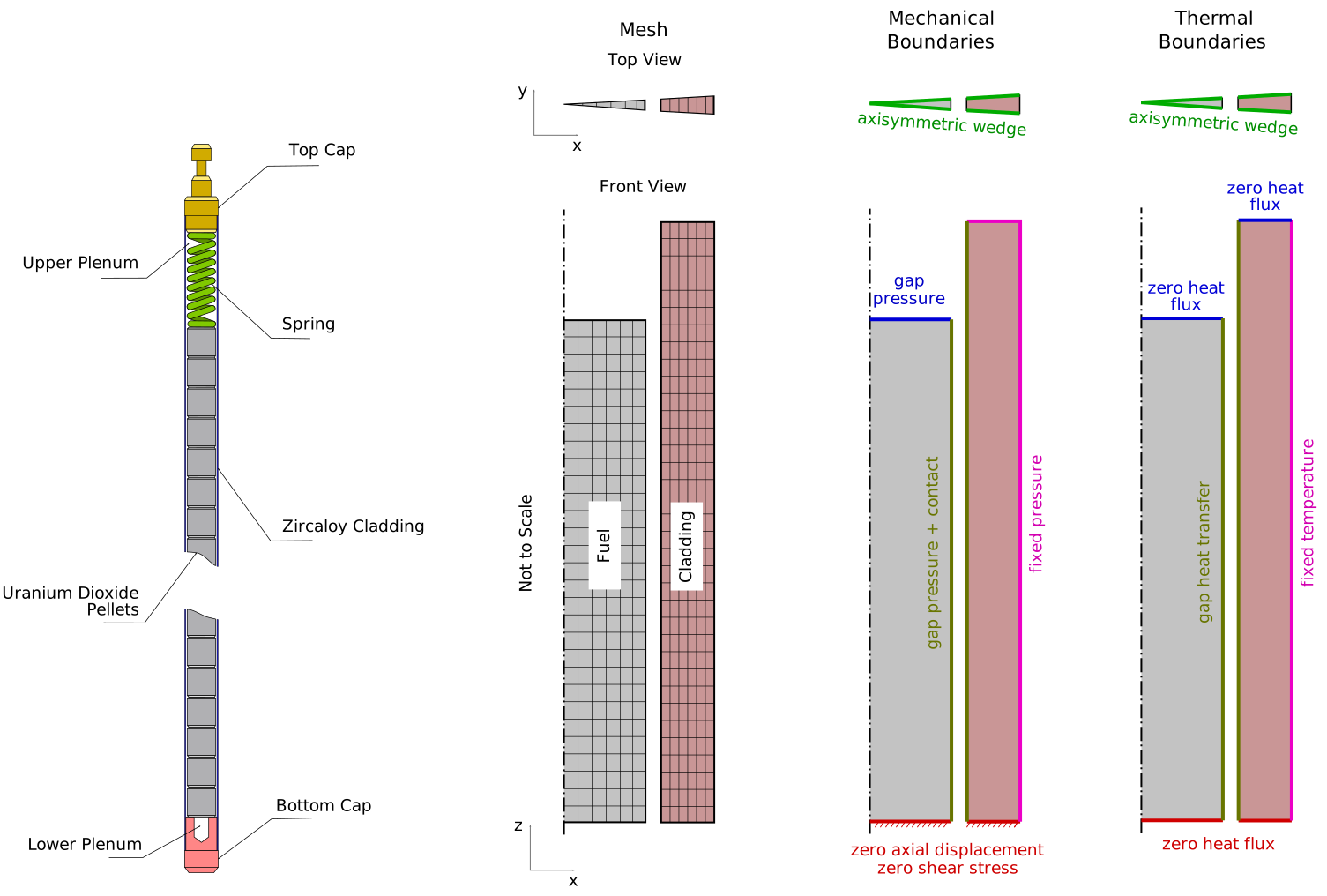
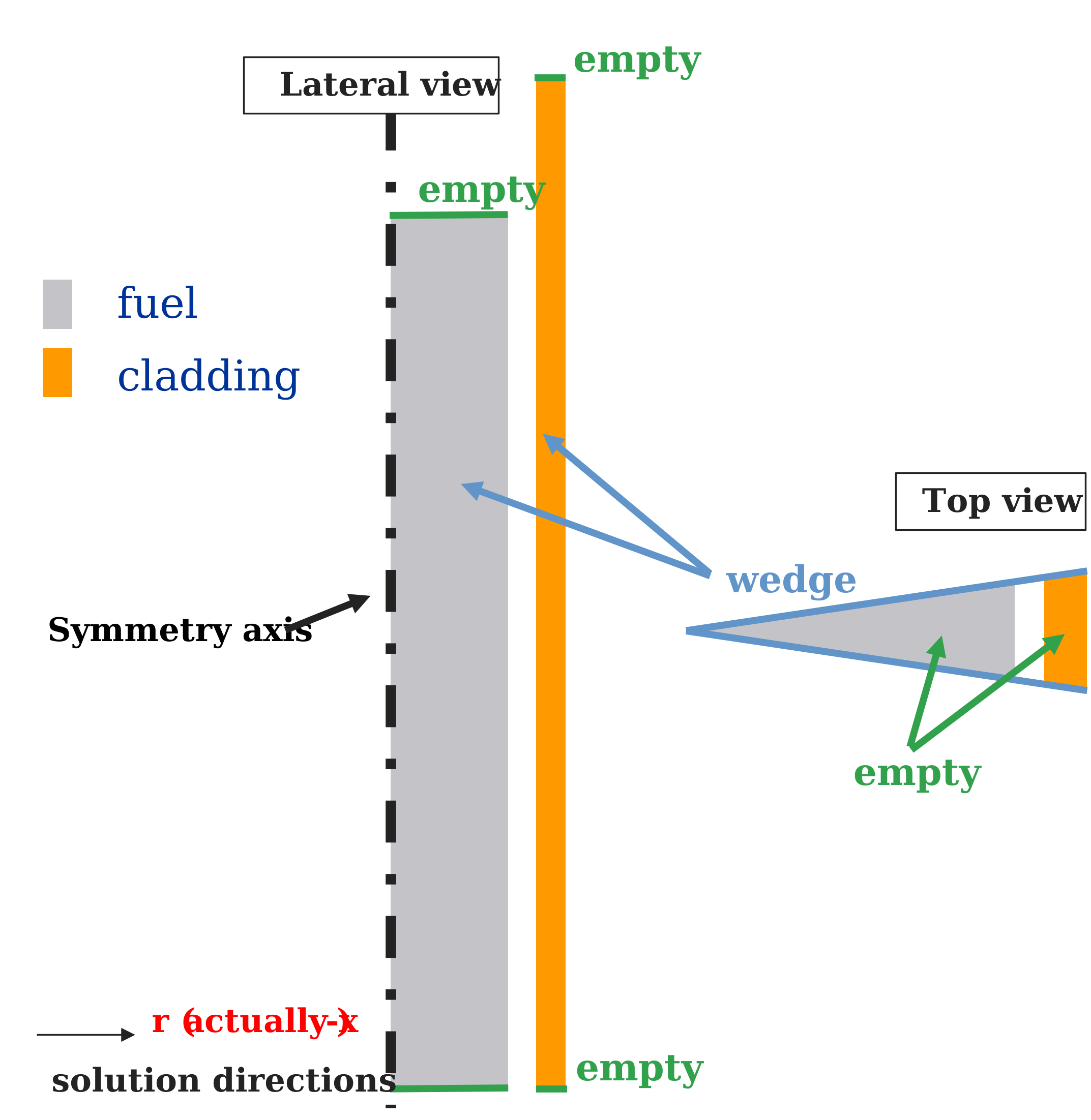
The following figure illustrates a typical computational domain, mesh, and boundary definitions for a light water reactor (LWR) fuel rod model using a 2D axisymmetric setup. In this example, the fuel is represented as a smeared column where individual pellets are not resolved:
Using the blockMesh Utility
The blockMesh utility is a powerful tool for generating structured meshes in OpenFOAM. It reads a dictionary, typically named blockMeshDict, which is usually located in the system/ folder of an OpenFOAM case. While this guide is not comprehensive, below is a breakdown of the key sections in the blockMeshDict file and how they are used.
The blockMeshDict dictionary is divided into four main sections:
- Vertices: Defines the coordinates of the mesh vertices. Each vertex is identified by its position in 3D space.
- Blocks: Describes the mesh blocks, which define the cells between the vertices. This section controls the mesh resolution, cell grading, and geometry.
- Edges: Used to define curved edges between vertices. For 1D and 2D smeared column simulations, this section is usually empty. However, in cases involving 2D r-z simulations of discrete pellets, this section can be used to capture curved features like dish-shaped pellet surfaces.
- Boundary: Specifies the boundary patches and their types (e.g., walls, empty patches, symmetry planes, etc.). Each patch defines a region of the computational domain that interacts with external conditions or other regions.
Below is a commented example of a simplified blockMeshDict, with some useful annotations:
For more information, refer to the official OpenFOAM blockMesh documentation.
convertToMeters 0.001; // Units are in millimeters

rFuel 4.525; // (1)
// ... Followed by other variable declarations

// Vertices Section: Defines the mesh vertices in 3D space
vertices
(
    (0 0 0)        // Vertex 0
    ($rFuel 0 0)   // Vertex 1 (radius of the fuel)
    // ... Additional vertices
);

// Blocks Section: Defines the mesh blocks between vertices
blocks
(
    hex (0 1 2 0 3 4 5 3) fuel (30 10 1) simpleGrading (0.1 1 1) // (2)
    // ... Additional blocks
);

// Edges Section: Defines curved edges (left empty for standard 1D/2D smeared columns)
edges
(
    // Empty for smeared column meshes
);

// Boundary Section: Defines boundary patches and types
boundary
(
    fuelTop
    {
        type empty; // (3)
        faces ( (3 4 5 3) ); // (4)
    }

    fuelOuter
    {
        type patch;
        faces ( (1 2 10 9) );
    }

    // ... Additional boundary patches
);
 You can define variables and perform operations with them. This is especially useful for automating mesh generation and making the dictionary easier to modify or extend.
- The
simpleGradingoption allows for multi-directional cell grading, making it possible to refine the mesh in specific areas or create non-uniform grids. - You can specify boundary types directly in the
boundarysection. In this example,fuelTopis marked asempty, which indicates that no solution is computed normal to this boundary (typically the z-direction in 2D axisymmetric simulations). - Boundary patches are defined using faces, which are constructed from the vertices. The order of vertices follows the right-hand rule, ensuring proper orientation.
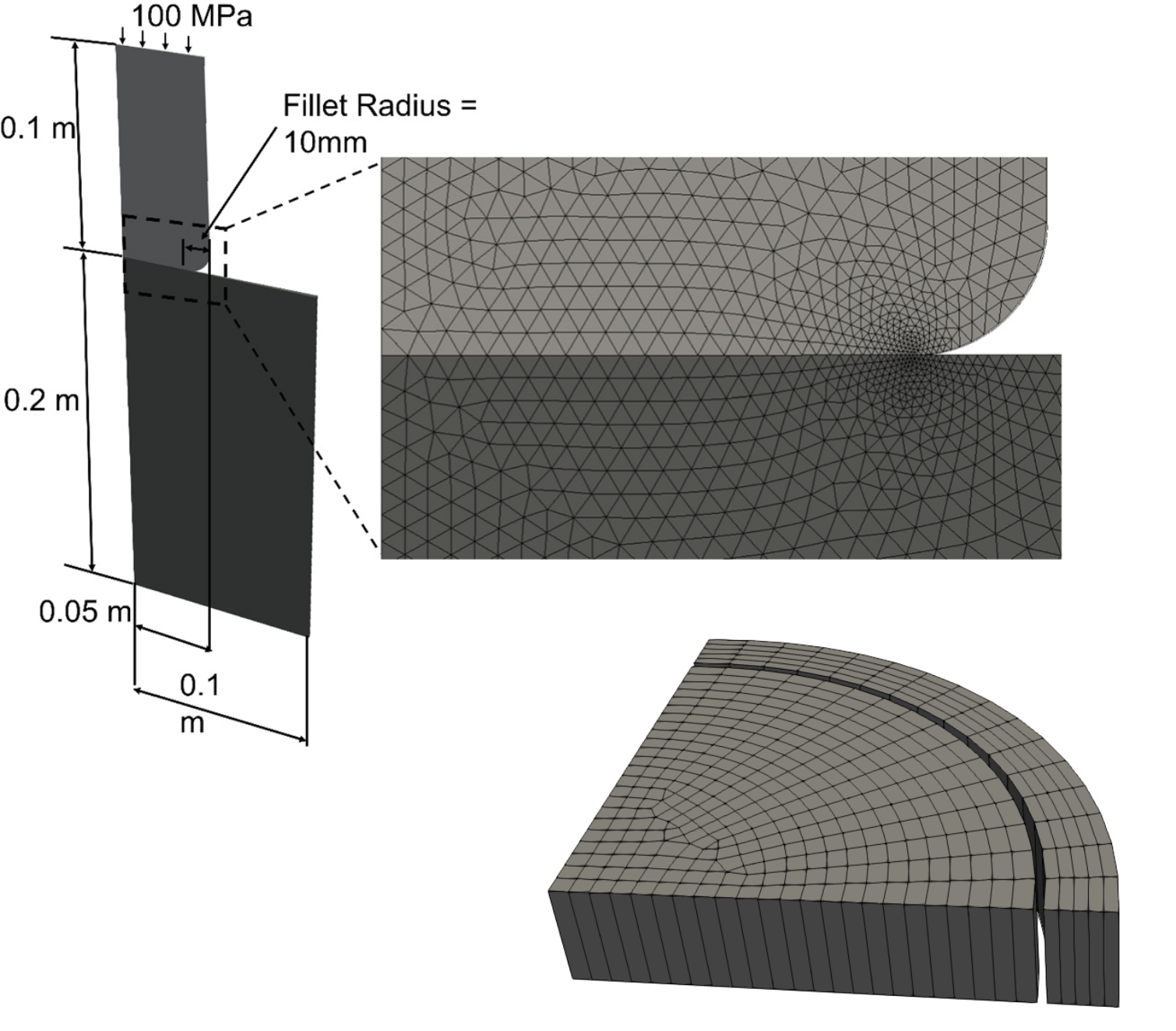
While blockMesh is a powerful tool for generating geometries up to 2D r-z discrete simulations, it is limited to creating structured meshes. For more complex geometries, we recommend using more advanced software like Cubit or Salome. These tools provide more flexibility and control over the mesh generation process, enabling the creation of unstructured and highly detailed meshes. In the figure below, you can see two examples of meshes generated with Salome, a punch test case and a quarter rod disc mesh, respectively.
General Considerations on Boundary Types for Fuel Rod Simulations
This section explains the boundary types necessary for performing 1D or 2D simulations in OFFBEAT. While OpenFOAM meshes are inherently 3D, both 2D and 1D problems can be efficiently modeled by applying appropriate boundary conditions:
-
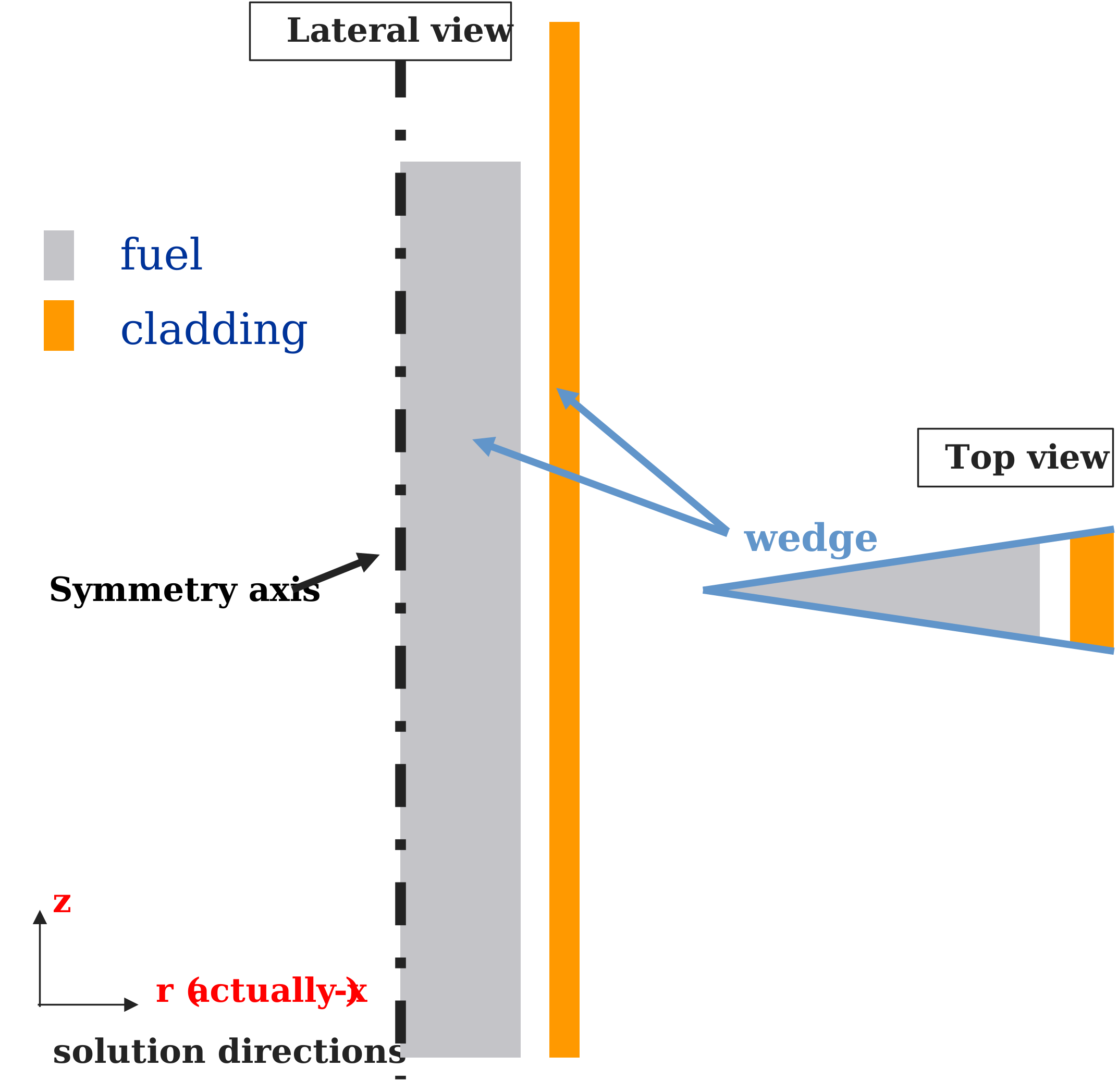
2D axisymmetric problems:
wedgeboundaries are applied in the \(\theta\) direction to simulate the axisymmetry of cylindrical geometries. OFFBEAT handles these boundaries by deactivating the azimuthal component of the mechanical solution.Warning
When selecting
wedgeas a patch type, ensure that the corresponding patch field type (i.e., boundary condition) in the field boundary dictionary (in the0/folder) is also set towedge.Warning
The angle of a wedge should typically be 1-2 degrees. For very refined meshes (in the radial direction), OpenFOAM may issue warnings about wedge faces not being perfectly planar. To mitigate this issue, reducing the wedge angle further has been found to help reduce the errors (probably as it improves the aspect ratio of the wedge cells) and warnings during the simulation. This is particularly relevant in case the
multiMaterialcorrection is activated.
-
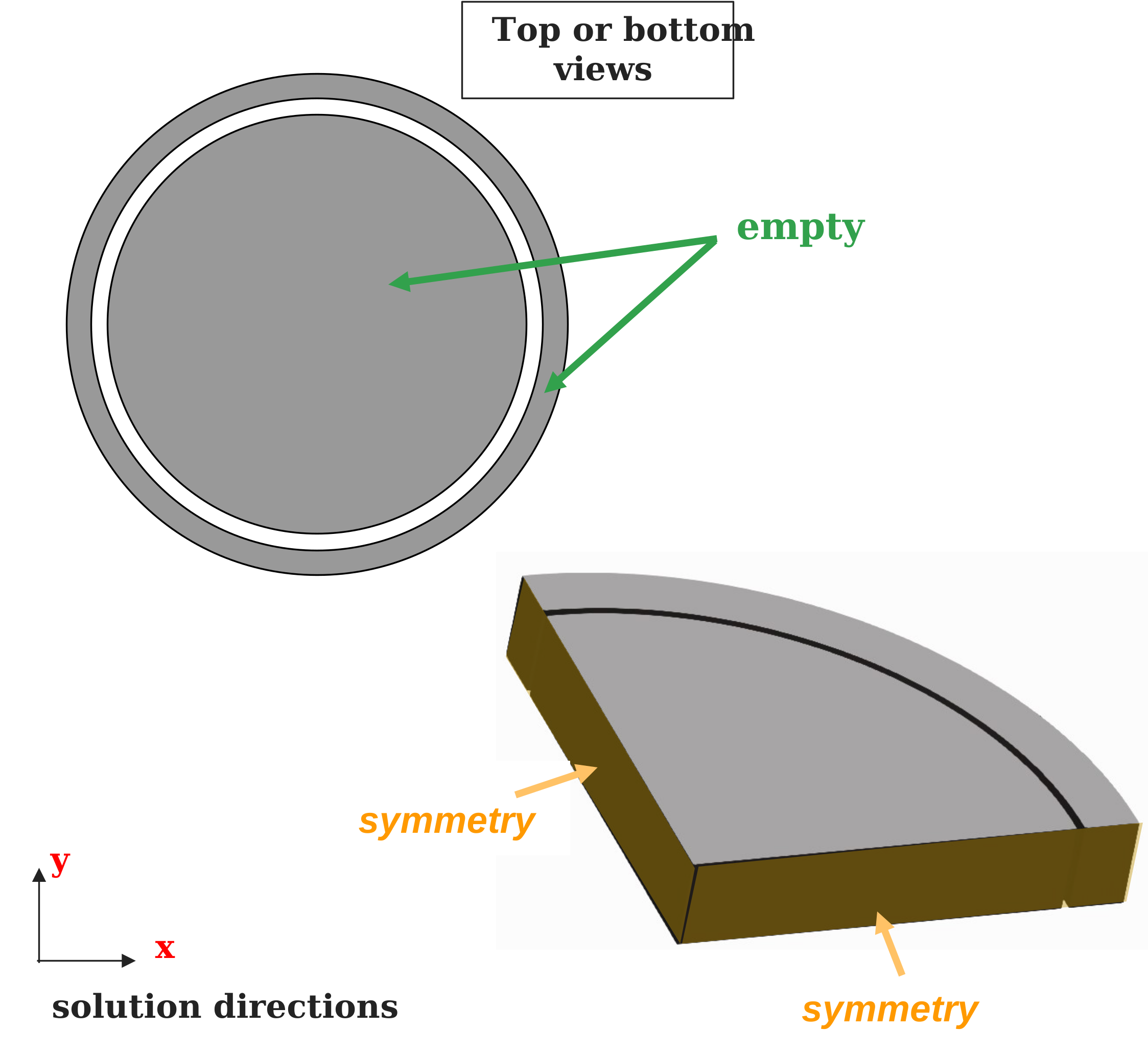
2D r-theta problems: For problems in r-\(\theta\) (e.g., analyzing fuel discs),
emptyboundary conditions are applied on the top and bottom boundaries, with only one cell in the axial (z) direction. Additionally, OpenFOAM patches likesymmetryorcyclicboundaries can be used to reduce the computational domain size (e.g., to half or a quarter).Warning
When selecting
emptyas a patch type, the corresponding patch field type must also be set toemptyin the field boundary dictionary.Note
While it's recommended to always define patches, OpenFOAM will not complain if it does not find the
emptypatch field definition in the boundary section of the main fields (e.g., the0/folder).Warning
This configuration corresponds to a plane strain condition, not plane stress. In this setup, the displacement and strain along the z-direction (\(\epsilon_{zz}\)) are zero. To simulate plane stress, activate the
planeStresskeyword in therheologyOptionssubdictionary ofsolverDict. For more information, refer to the Rheology section of this guide or the 2D r- \(\theta\) tutorial.
-
1D axisymmetric problems: Adding
emptyboundary conditions to the top and bottom boundaries of a 2D axisymmetricwedgemodel effectively reduces the problem to 1D.Warning
This setup corresponds to full plane strain with zero \(\epsilon_{zz}\). For a modified plane strain (often referred to as 1.5D), activate the
modifiedPlaneStrainkeyword in therheologyOptionssubdictionary ofsolverDict. For more information, refer to the Rheology section or the 1D rod tutorial.
Coupled Boundaries for Contact and Heat Exchange
Coupled boundaries are essential for handling contact, heat exchange, and other information transfers between regions. The patch type used for this purpose is regionCoupledOFFBEAT, which can be set directly in the blockMeshDict file or applied later using changeDictionary or foamDictionary utilities. This patch type is typically used for the fuelOuter and cladInner patches, but it can also be applied in other contexts (e.g., pellet-to-pellet contact).
Warning
This patch type is necessary to use coupled boundary conditions or patch fields, such as fuelRodGap or gapContact.
For regionCoupledOFFBEAT, you must define the neighboring patch name, neighboring region, and specify the owner, updateAMI, AMIMethod and options:
- Owner: We strongly recommend selecting the smaller patch (e.g., the fuel) as the owner for proper functioning of the Arbitrary Mesh Interface (AMI).
- updateAMI: Enabling this ensures that the mappings between the patches are updated with each iteration, accounting for the relative movement between fuel and cladding patches. This is especially important because the fuel and cladding patches move axially relative to each other. However, for complex geometries, enabling
updateAMIfor every iteration may add computational overhead. In future versions, we may implement an option to update the mapping only once per time step. - AMIMethod: By default, the AMIMethod is set to
faceAreaWeightAMIand we suggest to use this option for mot applications. If needed, this option can be selected from different available OpenFOAM methods (e.g., directAMI, nearestFace) depending on your specific simulation needs.
fuelOuter
{
    type            regionCoupledOFFBEAT;
    neighbourPatch  cladInner;
    neighbourRegion region0;
    owner           true;
    updateAMI       true;
    // AMIMethod       faceAreaWeightAMI;
}
cladInner
{
    type            regionCoupledOFFBEAT;
    neighbourPatch  fuelOuter;
    neighbourRegion region0;
    owner           false;
    updateAMI       true;
    // AMIMethod       faceAreaWeightAMI;
}
Mesh and Material Zones
In OFFBEAT, different regions of the computational domain (e.g., fuel, cladding) are defined as cellZones, each of which is given a name. These cellZones correspond to the materials used in the simulation. While the name of a cellZone is arbitrary (e.g., you could name it fuel, zone1, etc.), the material assigned to that zone must be selected from the available materials in OFFBEAT.
For instance, if you are modeling fuel with UO₂, you need to define a cellZone (e.g., named fuel, but it can be anything) in the mesh and then associate that zone with the material UO₂ in the materials dictionary. The name of the cellZone (e.g., fuel) is used to reference the zone in the materials section, while the type of material (e.g., UO₂) must be one of the predefined material types available in OFFBEAT.
The method for assigning cellZones depends on the meshing tool used:
-
In
blockMesh, you can name each block to represent a specific material zone (e.g., fuel or cladding) as in -
In other meshing tools, such as Gmsh or Salome, different methods are used to define zones, but the concept remains similar.
Note
If cellZones were not defined during the mesh creation process, they can be added later using OpenFOAM utilities such as topoSet.
Mesh Refinement Recommendations
- Radial direction: Based on experience, 30 radial nodes in the fuel and 10 to 20 radial nodes in the cladding offer a balance between accuracy and computational efficiency for thermal and mechanical simulations.
- Axial direction: OFFBEAT typically uses one mesh cell per axial power node in 1D simulations, while 2D smeared column simulations often range from 30 to 100 axial cells for a full lenght-rod. In 2D discrete pellet simulations it is suggested to use at least 20 to 30 axial cells per pellet. However, the appropriate axial resolution depends on the desired accuracy and computational resources.